

In this article
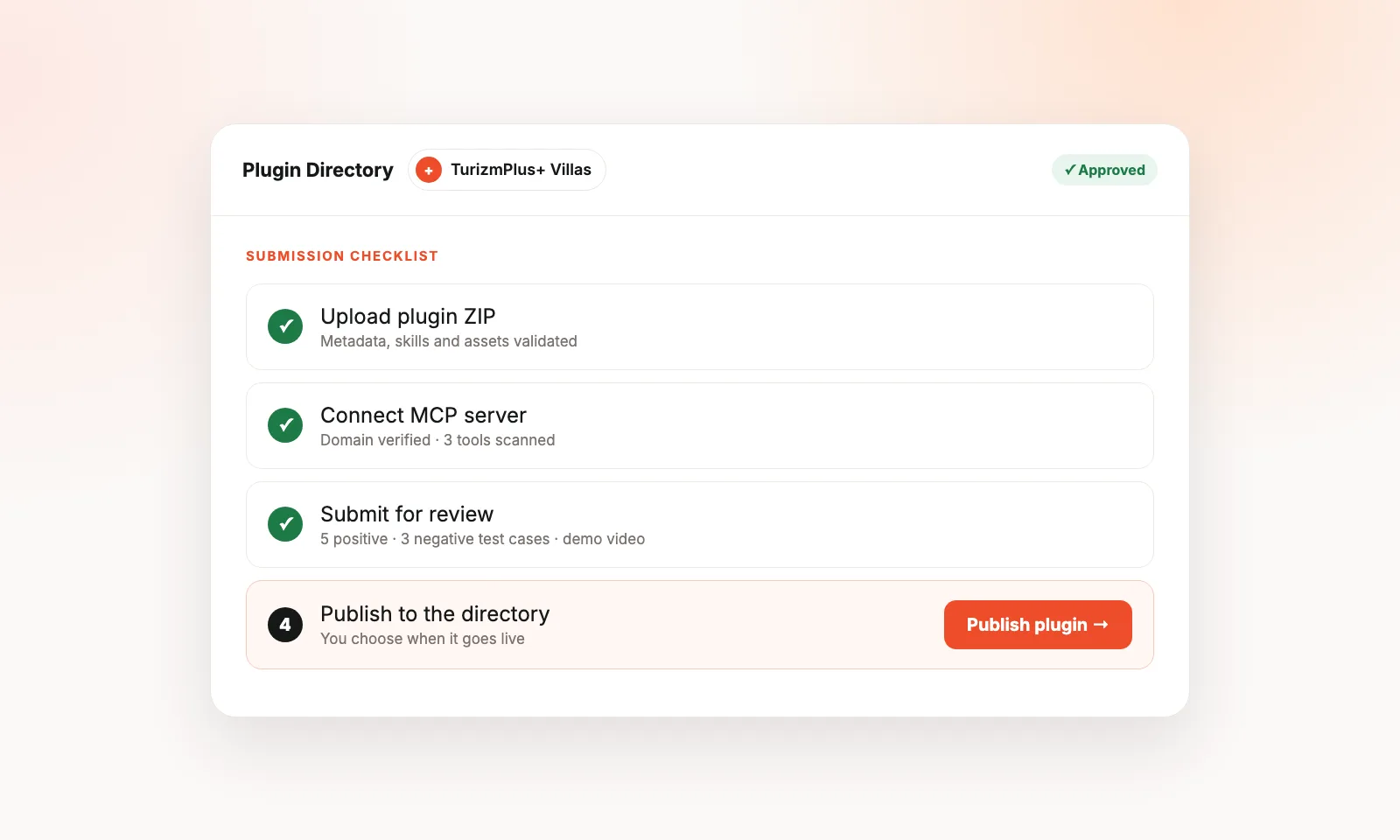
To list your app in the ChatGPT “app store,” you package it as a ChatGPT plugin, upload the ZIP in the OpenAI Developer Platform, connect your MCP server, pass automated checks, and submit it for review. After approval, you choose when to publish it to the Plugin Directory. You need a verified developer identity, a public MCP server, a privacy policy, a working test account, eight test cases and a short demo video.
One naming note first. On July 9, 2026, OpenAI renamed ChatGPT apps to plugins and replaced the App Directory with the Plugin Directory (OpenAI Help Center). Most people still search for “ChatGPT app store,” so this guide uses both names. An app is still the connection to your service. A plugin is the package that people find, install and use.
Why list your app in ChatGPT?
ChatGPT is now one of the largest distribution channels for software. At DevDay 2026 (September 29, 2026), OpenAI said developers can now launch native experiences to 1.2 billion weekly users across its products (OpenAI, DevDay 2026 Recap). When submissions first opened on December 17, 2025, that number was reported as more than 800 million (VentureBeat).
A listing gives you three things:
- Discovery in the directory. Users browse categories like Popular and New & Noteworthy, or search by name.
- Suggestions inside conversations. ChatGPT can recommend a relevant plugin while a user is chatting. DevDay 2026 added improved ranking and recommendations for this.
- Automatic use. Once installed, ChatGPT uses a plugin when it fits the request. Users can also call it with an @ mention.
Timeline: from ChatGPT apps to plugins
| Date | What happened |
|---|---|
| October 6, 2025 | OpenAI introduces apps in ChatGPT and the Apps SDK, built on the Model Context Protocol (MCP). (OpenAI) |
| December 17, 2025 | Developers can submit apps for review. The in-product App Directory launches. (OpenAI) |
| Early 2026 | First approved third-party apps roll out to users. |
| July 9, 2026 | Apps become plugins. The App Directory becomes the Plugin Directory. Plugins can bundle apps, skills and app templates. |
| September 29, 2026 | DevDay 2026: Plugin Creator, a redesigned submission flow, plugin extensions and MCP events. |
What is a ChatGPT plugin?
A ChatGPT plugin is a package that brings tools, knowledge and workflows into ChatGPT and Codex. According to OpenAI’s Help Center, a plugin can include:
- Apps: connections to your service, built as an MCP server. MCP (Model Context Protocol) is an open standard that lets AI models call your tools and read your data.
- Skills: reusable instructions, examples and code for a repeatable workflow.
- App templates: setups that workspace admins configure for their teams.
- Extensions: interactive panels, sidebar homes, file viewers and forms inside ChatGPT.
A plugin can be skills-only (no MCP server) or include one connected MCP server. Skills-only plugins have a lighter review: no MCP test cases, demo video or test credentials.
Before you start: requirements checklist
Get these ready before you upload anything. Missing items are the most common reason for delays.
| Requirement | Details |
|---|---|
| Verified developer identity | Individual or business verification in your OpenAI organization settings. The directory shows this name. |
| Correct permissions | Organization owners can submit. Other members need the Apps Management Write permission. |
| Plugin ZIP | Includes plugin.json, assets and skills. No secrets, no lifecycle hooks. |
| Public MCP server | Reachable over HTTPS, with domain verification. Required if your plugin uses an app. |
| Public URLs | Website, support, privacy policy and terms of service. All HTTPS, all owned by the same publisher. |
| Test account | Pre-filled with sample data. Must work without MFA, email or SMS codes, magic links or VPN access. |
| 5 positive + 3 negative test cases | Prompts, expected tools and expected results. |
| Demo video | A walkthrough of the test cases on web and mobile. |
| Brand assets | Icon (and optional dark icon, logo and screenshots). PNG, JPEG, WebP or SVG, max 5 MiB, at least 48×48 px. |
Source: Upload and submit your plugin, OpenAI Developers.
Step 1: Build your MCP server and tools
Your app’s capabilities come from tools on your MCP server. ChatGPT reads each tool’s name, description and input schema, then decides when to call it. OpenAI’s metadata guide says ChatGPT and Codex “decide when to call your tool based on the metadata you provide” (OpenAI).
Follow these rules for every tool:
- Use clear, verb-first names, such as
get_order_statusorsearch_villas. No jargon or promotional words. - Write honest descriptions. Start with “Use this when…” and list what the tool should not be used for.
- Set all three annotations, as required by the plugin guidelines:
readOnlyHint:trueonly if the tool never changes anything outside the conversation.destructiveHint:trueif it can delete, overwrite, cancel or revoke access. Being able to undo does not make it non-destructive.openWorldHint:truefor the public web or open-ended entities;falsefor a private account or workspace.
- Ask for the minimum input. Never request the full chat history or “just in case” fields.
- Return only relevant data. Strip trace IDs, session IDs, timestamps and logging data from responses.
Example from travel: a villa rental company could expose search_available_villas (read-only), get_villa_details (read-only) and create_booking_request (not read-only, not destructive). A guest could then ask ChatGPT for “a pool villa in Kaş for four people, October 12–19,” and see real availability. We built exactly this for villa rental websites (read the announcement, in Turkish).
If your plugin shows UI inside ChatGPT, declare every iframe origin in _meta.ui.csp.frameDomains. You must also justify each embedded page during submission.
Step 2: Package your plugin
Your ZIP holds a plugin.json file (or .codex-plugin/plugin.json) with identity and listing fields. The key limits are:
| Field | Required | Limit |
|---|---|---|
name |
Yes | 64 chars, lowercase letters, numbers, hyphens |
version |
Yes | Semantic version, e.g. 1.0.0 |
displayName |
Yes | 30 chars |
shortDescription |
Yes | 30 chars |
longDescription |
Yes | 4,000 chars |
developerName |
Yes | 80 chars |
category |
Yes | From the dashboard list |
websiteURL, supportURL, privacyPolicyURL, termsOfServiceURL |
Yes (for MCP review) | HTTPS, 1,024 chars |
defaultPrompt |
No | Up to 3 prompts, 128 chars each |
publication.countries |
No | Uppercase codes, e.g. ["US", "GB", "TR"] |
publication.translations |
No | Localized subtitle (30 chars) and description (4,000 chars) |
Two tips:
- Use
defaultPrompt. Example prompts show users how to start, and the guidelines ask for them. - Add translations. If you serve markets like Turkey or Germany, localized descriptions help users in those countries understand your listing.
Step 3: Upload the ZIP and fix automated findings
- Open Plugins in the OpenAI Developer Platform.
- Select Upload new or existing plugin.
- Choose your verified developer identity.
- Upload your ZIP. A draft opens after validation.
- Open Metadata & Skills and wait for checks to finish.
- Use Copy issues to grab any findings. Fix them in your package and upload a new ZIP.
If your plugin uses an MCP server, include it in the first ZIP. You cannot add an MCP server to an existing skills-only plugin later.
Step 4: Connect and verify your MCP server
- Open MCPs, pick your server and select Connect.
- Check the server URL and authentication settings.
- Complete domain verification. Host the exact token as plain text at:
https://<your-host>/.well-known/openai-apps-challenge - Wait for the automated tool scan. Review every discovered tool.
Only one MCP server can be connected per plugin.
Step 5: Add review materials and submit
For plugins with an MCP server, OpenAI requires:
- 5 positive test cases: scenario, user prompt, expected tools and the result a reviewer should see.
- 3 negative test cases: prompts where your plugin should not act, and why.
- Test account details: login URL, workspace info and sign-in steps.
- Demo video URL: a walkthrough of your test cases.
- Release notes: what changed in this version.
Then select Submit for review and confirm the policy attestations. Track progress under Review status. OpenAI sends feedback by email. Only one review can be active per plugin at a time.
OpenAI does not publish a fixed review time. Plan for at least one round of feedback.
Step 6: Publish and keep it updated
Approval does not publish your plugin automatically. You choose when to select Publish plugin.
After launch:
- MCP server changes go live automatically. OpenAI scans hosted servers daily. Use Rescan to check sooner. New tools stay hidden until approved.
- Metadata and skills changes need a new ZIP with a higher version number, plus a new review.
- Changing your MCP server URL requires contacting OpenAI support.
- Appeals: if a tool finding looks wrong, select Appeal. For a rejected submission, reply to the rejection email.
Common rejection reasons
According to OpenAI’s plugin guidelines, plugins are most often rejected for:
- Demo, trial or incomplete functionality.
- Tool descriptions that don’t match behavior.
- Requesting full chat history or broad context.
- Missing or weak privacy policy. It must cover data categories, purposes, recipients, retention and user controls.
- Unverified developer identity.
- Login without working demo credentials.
- Bypassing third-party API limits or scraping without permission.
- Existing mainly to serve ads.
- Metadata that tries to game plugin selection.
Also watch your listing copy. Don’t add “MCP,” “MCP Server” or “Plugin” to your brand name. Don’t use a single dictionary word as a name. Don’t mention prices, free trials or discounts. Don’t compare yourself to competitors.
Monetization rules: what you can and can’t sell
| Allowed | Not allowed |
|---|---|
| Selling physical goods with checkout on your own domain | Selling digital goods: subscriptions, credits, tokens, digital content |
| Letting users sign in to an existing paid account | Showing plans, starting subscriptions or upsell prompts |
| Explaining a feature needs a different plan | Linking straight to checkout pages |
| Linking to an informational plans page | ChatGPT-only fees or surcharges, or serving ads |
Some categories are banned outright, including gambling, adult content, weapons, tobacco and vapes, and “high-chargeback travel services.” Travel brands should keep refund and cancellation terms clear.
How to get discovered after you’re listed
Being listed is step one. Being chosen by ChatGPT is step two. OpenAI recommends treating metadata like product copy:
- Build a “golden prompt set.” Include direct prompts (users name your brand), indirect prompts (users describe the outcome) and negative prompts (another tool should answer).
- Measure precision and recall. Did the right tool run? Did it run every time it should?
- Change one field at a time and log results.
- Review tool-call analytics weekly. A spike in wrong-tool calls usually means your metadata drifted.
- Get on the web, too. ChatGPT also cites websites. Clear pages about your product, with FAQs and structured data, help both search engines and AI answers.
Apps that resonate with users may be featured in the directory or recommended by ChatGPT (OpenAI). Plugins can also carry an OpenAI Verified badge after OpenAI reviews them for quality, reliability and usefulness.
FAQ
Is there a ChatGPT app store?
Yes. It is now called the Plugin Directory. Users open Plugins in the ChatGPT sidebar on web, desktop or mobile. It replaced the App Directory on July 9, 2026.
How much does it cost to list an app in ChatGPT?
OpenAI does not list a submission fee. Your costs are building and hosting your MCP server and any developer verification steps.
How long does ChatGPT plugin review take?
OpenAI does not publish a review time. Feedback arrives by email, and only one review per plugin can run at once.
Do I need an MCP server to publish a plugin?
No. A skills-only plugin needs no MCP server and has a lighter review. You need an MCP server to connect ChatGPT to your own service, data or actions.
Can I charge users inside my ChatGPT plugin?
Only for physical goods, using checkout on your own website. Selling subscriptions, credits or other digital products inside a plugin is not allowed.
Can I limit my plugin to certain countries?
Yes. Use publication.countries with uppercase country codes, such as ["US", "GB"]. An empty list removes the limits.
What is the difference between a ChatGPT app and a plugin?
An app is a connection to your service, built on MCP. A plugin is the installable package. It can hold one app, skills, app templates and extensions.
Do my existing app connections still work?
Yes. OpenAI says existing app connections were not affected by the July 2026 change.
Key takeaways
- The ChatGPT “app store” is now the Plugin Directory. Plugins bundle apps, skills and templates.
- To list, you need a verified identity, a public MCP server, legal pages, a test account, 8 test cases and a demo video.
- Clear, honest tool metadata decides both approval and discovery.
- Only physical goods can be sold, using your own checkout.
- After launch, MCP changes update automatically. Metadata changes need a new ZIP and review.
Sources
- OpenAI Help Center: Plugins in ChatGPT
- OpenAI Developers: Upload and submit your plugin
- OpenAI Developers: Plugin guidelines
- OpenAI Developers: Optimize metadata
- OpenAI: DevDay 2026 Recap (September 29, 2026)
- OpenAI: Developers can now submit apps to ChatGPT (December 17, 2025)
- OpenAI: Introducing apps in ChatGPT and the new Apps SDK
- VentureBeat: OpenAI now accepting ChatGPT app submissions