
Handle every conversation in one place
See new messages from every channel in a shared inbox, with customer history and context.
- Shared inbox
- Conversation and customer history
- Unread and open requests
Manage messaging, social media, website live chat, email, SMS and voice calls in a shared inbox. Route requests to the right team, keep customer history intact and avoid losing conversations across channels.
 WhatsAppHandle messages as a team
 InstagramNever miss a DM
 FacebookManage Messenger conversations
 TelegramManage Telegram messages
 TikTokHandle direct messages
 LINEUnify LINE conversations
 XMessaging · coming soon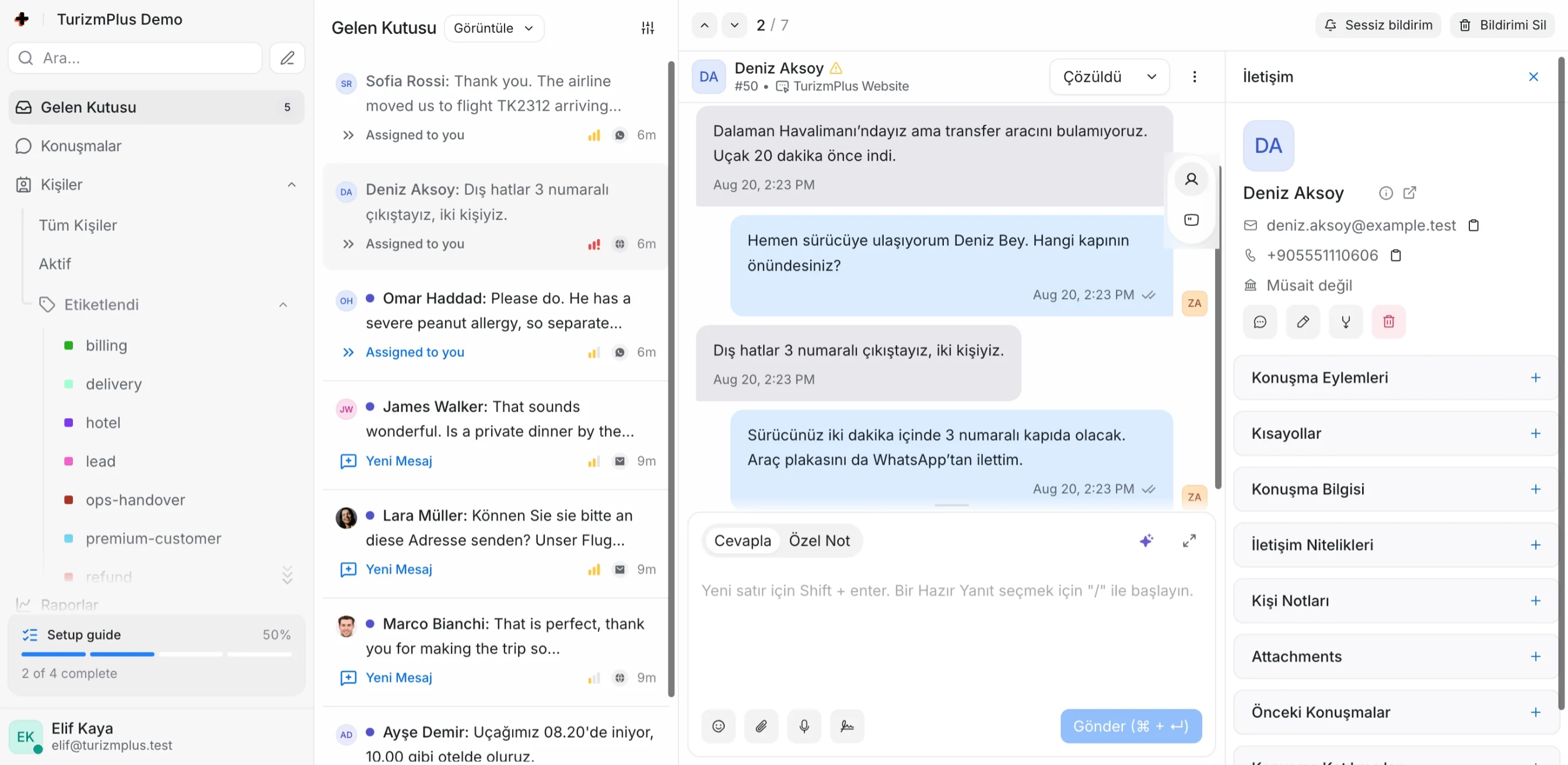
Every step, from a new message to the right agent’s reply, stays in the same workspace. Your team sees what the customer needs, not just where they wrote.
See new messages from every channel in a shared inbox, with customer history and context.
Assign conversations by team or agent, and collaborate with tags, private notes and saved replies.
Use business hours, automatic replies and routing rules to handle repetitive communication consistently.
TurizmPlus AI uses the conversation context to speed up routine work while your team retains control over what gets sent.
Creates response suggestions from the conversation and your knowledge sources.
Condenses long conversations into the key points and customer request.
Translates incoming messages and prepared replies for the team.
Rewrites a reply to be shorter, clearer or more professional for your brand.
Of course. We can check the new dates and update your transfer at the same time. Once I confirm your booking details, I will share the available options.
The Communication Platform combines conversations with team responsibility, business rules and customer context, so support does not depend on personal inboxes.
Let’s build your workflowAssignments, private notes and ownership keep responsibility clear.
See communication history and customer information beside the conversation.
Standardise operations with routing rules based on channel, team and workflow.
Track open conversations, team workload and communication activity in one view.
Use the platform independently or plan it with other TurizmPlus products. Connect the customer conversation to the operational record and reduce information loss between teams.
Manage the essentials of support—from receiving a conversation and enriching the customer profile to reporting and self-service content—in one platform.
Organise and prioritise busy communication without duplicate replies.
Keep every customer in one profile across channels, with history and custom fields.
Evaluate volume and team activity by channel, inbox, agent, team and tag.
Speed up common actions and turn repeated answers into team standards.
Adapt customer touchpoints to your brand and publish a help centre.
Send communication events to other systems or connect a custom channel.
TurizmPlus product experience
Website live chat, email, WhatsApp, Facebook Messenger, Instagram, Telegram, TikTok, LINE, SMS, voice calls and custom API channels can be managed in one workspace. X messaging is on the roadmap.
Yes. Conversations can be assigned by team and agent, with tags, private notes and saved replies.
Yes. Business hours, welcome messages, automatic replies and team or agent routing can be configured around your workflow.
TurizmPlus AI assists with response drafts, summaries, translation and tone adjustment. Your team reviews and sends every response.
Yes. It can be used independently or planned to work with the TurizmPlus Villa and Visa Platforms.
Yes. Logo, colours, domain and customer-facing interfaces can be configured for your brand.
TurizmPlus plans discovery, channel connections, configuration, hosting and ongoing technical support.
Let’s review your channels, team structure and current processes, then define the right Communication Platform setup.
Contact the sales team